
ChatGPT + Claude + Sellit
Run your shop from ChatGPT or Claude. Skip the dashboard.
Connect Sellit to your AI app once. Then you see and change orders, stock, products and sales in chat, and a morning report arrives by itself. Payments, refunds and texts to buyers are prepared first and run only on your word.
Works with ChatGPT, Claude, Cursor, n8n and any app that supports MCP.

What is shop automation with ChatGPT and Claude?
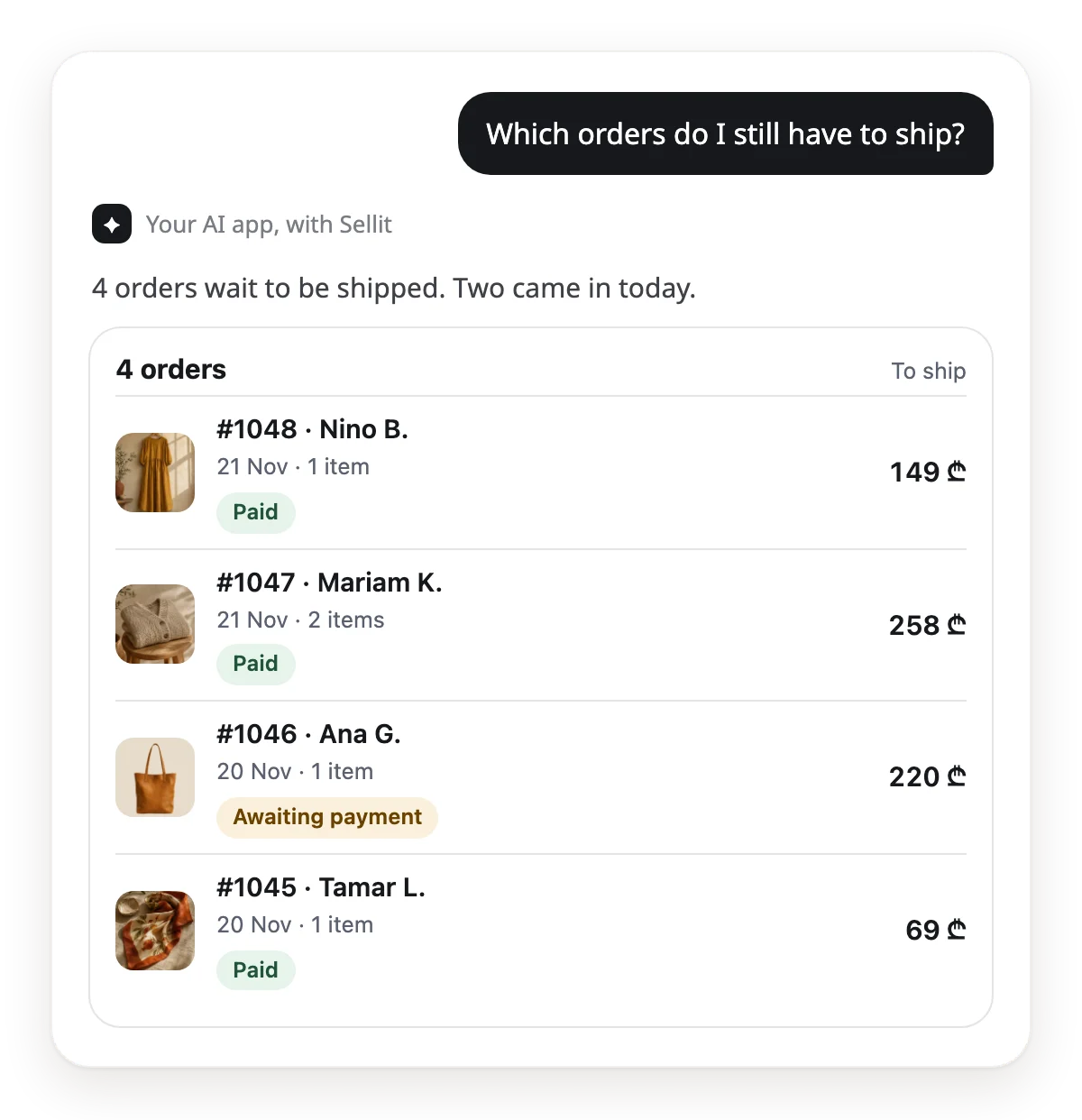
Sellit has an MCP server, the open standard through which ChatGPT, Claude and other AI apps get more than 100 actions in your shop. You connect once, then you write in chat: "Which orders do I still have to ship?" and see the answer as a Sellit card. You can also put the same question on a schedule in your AI app. Then the morning orders, a low-stock alert and a weekly summary arrive by themselves. A refund, marking an order paid, a manual order or a text to a buyer is prepared first: the AI tells you what will change, and it runs only when you asked for exactly that or agree.
Less time in the dashboard. More time selling.
The whole shop in one chat
Orders, stock, products, discounts, payment links and figures. Ask in plain words and see the answer as a card.
Reports arrive by themselves
Your AI app tells you in the morning what to ship, and in the evening which product is running low. You only read.
Money stays in your hands
Marking paid, a refund and a manual order are prepared first. The AI tells you what will change, and it runs on your word.
In plain words
Talk to your AI app the way you talk to a colleague. No code, no spreadsheets, no commands.
What it looks like
One sentence. One job done.
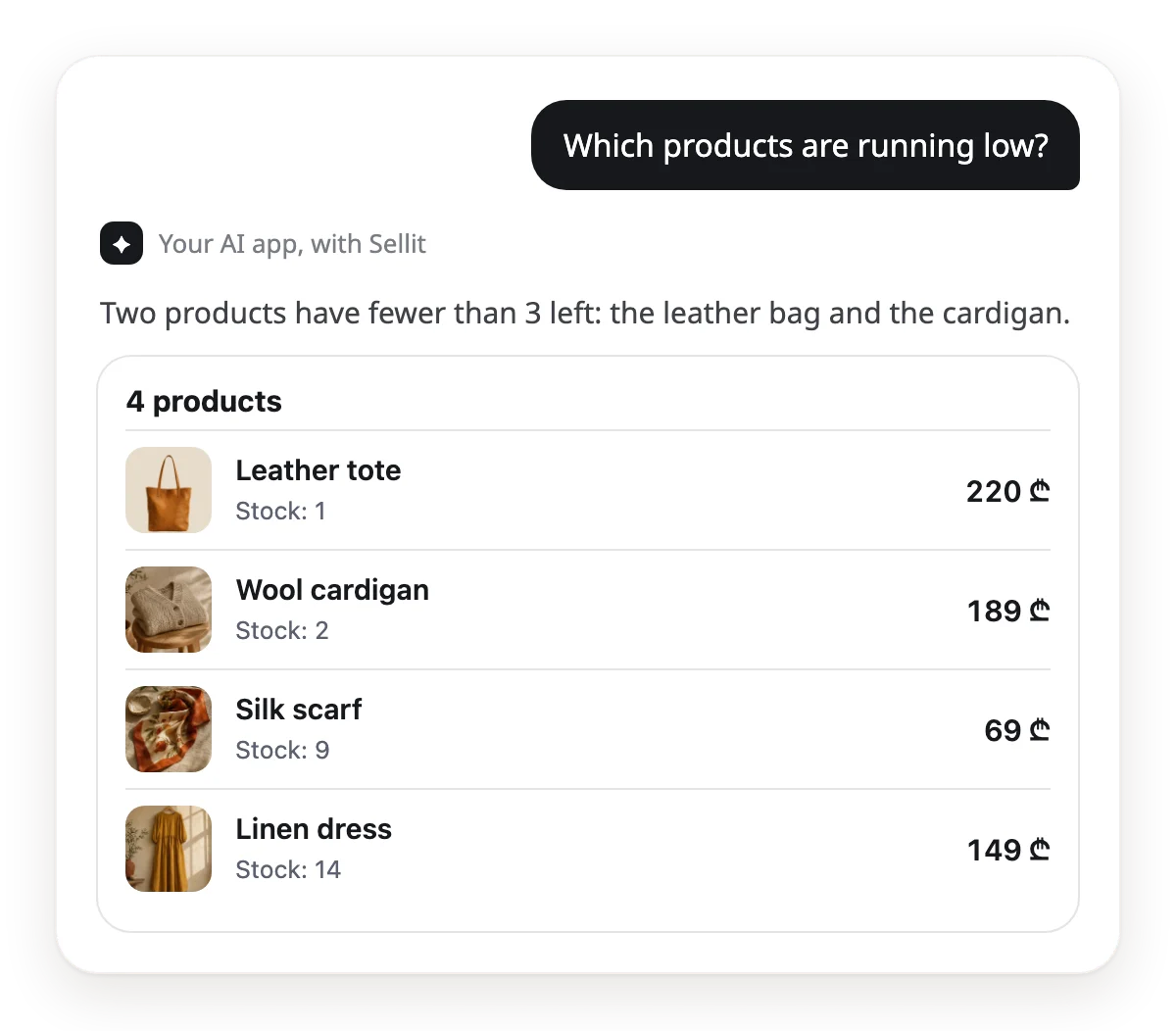
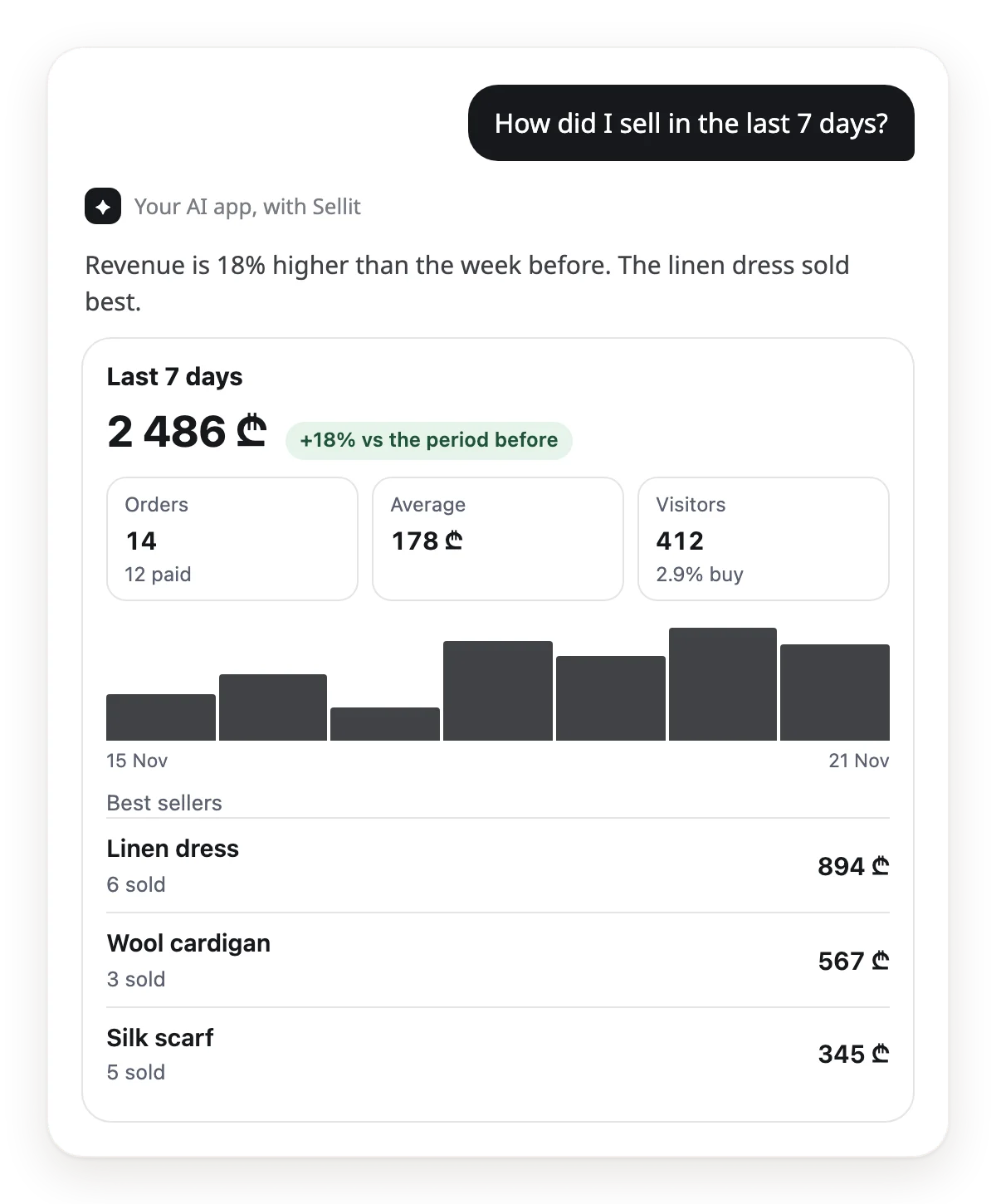
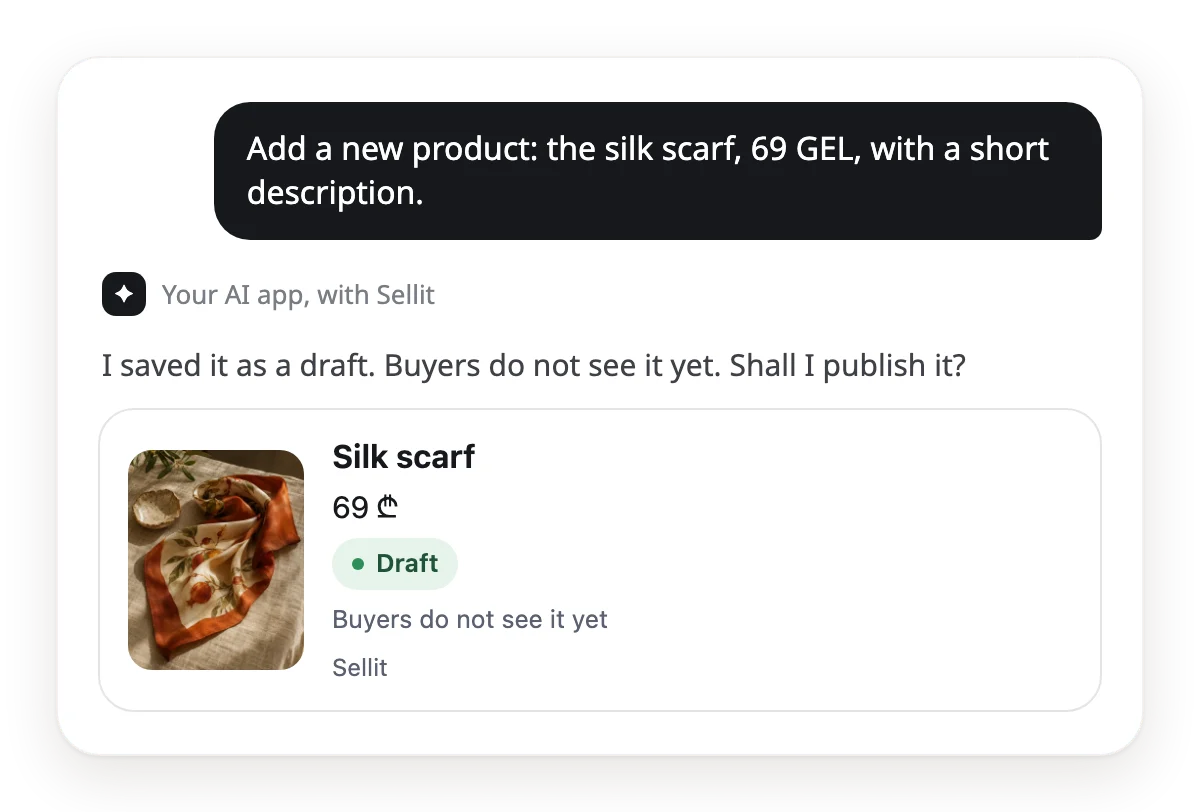
These are real Sellit cards that an AI app shows for your question. The data comes from a demo shop.
Orders
Stock
Sales
A new product
No Sellit login needed
The whole shop, from one chat.
Everything you do in the dashboard works in your AI app too. Here is each area, with one sentence to start.
Orders
The list and search, every detail of one order, status, notes, the buyer's address, manual orders and payment links.
Change the delivery address on order 1048.
Products and stock
A new product, any field, sizes and colours, Georgian and English text, stock, hiding and copying.
Add sizes S, M and L to the linen dress.
Prices and sales
Discount codes, timed sales, collections and categories.
Make a collection called "Gifts under 100 GEL".
Sales figures
Revenue, orders, average order, visitors, two periods side by side, best sellers and product views.
Compare this month with last month.
Customers and messages
Customers and notes, requests from the site, Facebook leads, Instagram and Facebook conversations.
Show me today's Instagram messages.
Site and design
Pages, sections, colours, fonts, menus and the footer. All in a draft, with a preview link.
Add the new collection to the home page and show me a preview.
Google and SEO
The shop's title and description for search, and Google on or off.
Write the shop's title for Google and turn it on.
Delivery and shop rules
Delivery prices by city, opening hours, business details, social links, checkout fields and SMS texts.
Set delivery to Batumi at 8 GEL.
Bookings and menu
Bookings, free times, staff, the café menu and combos.
What free times do I have on Friday?
Gift cards
The list and balances, a new card for a recipient, and turning a card off.
Prepare a 100 GEL gift card for Nino.
Some areas depend on the kind of shop (bookings, menu) or on a Facebook connection. A staff member's AI app does only what that staff member may do.
Sell more
8 ways AI helps you sell more.
The AI sees the whole shop at once: views, sales, stock and messages. Here is how to use that.

The AI helps, but it promises no result: advice is advice, and the decision is yours. The AI does not send replies or reminders to a buyer: it drafts the text, you send it.
Sell right in the chat
A buyer wrote on Instagram or called? The AI makes a payment link in seconds. You send it, they pay by card.
Make me a payment link: the leather tote, 1 piece.
Many views, few sales
The AI finds products people look at but do not buy, and suggests a new title, description or price.
Which products get many views but few sales? What should I change?
Best sellers first
Your best sellers as a collection on the home page: buyers see what sells on the first screen.
Make a collection of my 6 best sellers and add it to the home page.
A short sale for slow stock
The AI finds products that have not sold for a long time and prepares a short sale to move old stock.
Which products have not sold in 30 days? Suggest a 3-day sale.
Get found on Google
A product with no description shows badly in search. The AI fills empty descriptions in Georgian and English.
Which products have no description? Write them in Georgian and English.
No message left unanswered
The AI gathers the requests and messages you have not answered and drafts short replies. You send them.
Who is still waiting for an answer? Draft a short reply for each.
The almost-sold order
An unpaid order is half a sale. The AI shows who is waiting to pay and drafts a reminder text.
Who has not paid yet? Draft a short reminder for each.
English for visitors
The AI writes an English name and description for your products, so a foreign buyer reads them in their own language.
Write an English name and description for every product.
Automations
Set it once. It runs every day.
Copy a text and save it as a scheduled task in your AI app. These recipes ask the AI only to read and send you a report.

Morning orders
Every day, 09:00Show me every Sellit order that has not been shipped yet. For each one, tell me what to pack and for whom.

Running low
Every day, 18:00Which products have fewer than 3 left? List them, best sellers first.
Weekly summary
Mondays, 10:00Compare the last 7 days with the 7 days before: revenue, orders and the 3 best-selling products. End with one tip.

Unpaid orders
Every day, 12:00Which orders are waiting for payment or confirmation? Show the numbers, totals and how many days each has waited.

New requests
Every day, 20:00Who wrote to me from the site today and still has no answer? Show the requests, newest first.
Tomorrow's bookings
Every evening, 21:00What bookings do I have tomorrow? Show the time, the service and the client's name.
Which AI app for what
One Sellit, any AI app. Each one is strong at different work.
Claude
- Best for
- Daily work in chat, and scheduled reports.
- How to add it
- In Sellit: Settings → AI apps → "Add to Claude", then sign in with your Sellit account.
- Keep in mind
- Scheduled tasks are on the paid plans. The free plan allows one custom connector.
ChatGPT
- Best for
- Questions, and Sellit cards in chat: orders, products, sales.
- How to add it
- In ChatGPT, add a custom MCP server with the Sellit address, then sign in with your Sellit account.
- Keep in mind
- OpenAI's help page (2026-11-21) gives changes through a custom MCP server to Business, Enterprise and Edu; Pro can only read.
Cursor and VS Code
- Best for
- Working on the site in an editor: pages, sections and texts.
- How to add it
- In Sellit: Settings → AI apps → add it in one tap, then sign in to Sellit.
- Keep in mind
- For schedules, pick Claude, Claude Code or n8n.
Claude Code
- Best for
- Big jobs in one go, such as texts for 50 products.
- How to add it
- In Sellit, make a key: Settings → AI apps.
- Keep in mind
- Scheduled tasks run in the cloud, with the laptop closed.
n8n
- Best for
- A report to Telegram or e-mail, with no chat at all.
- How to add it
- In Sellit, make a "View only" key. In n8n: Schedule Trigger → AI Agent → MCP Client.
- Keep in mind
- You build the schedule yourself. You need your own AI model key.
Nobody is there to say yes to a scheduled task. So give it only reading work. Give n8n and other tools a "View only" key: such a key cannot change anything. In Claude and ChatGPT, keep approval on for the change tools: a task then stops before a change and waits for you.
Teach your AI SellitThe free Sellit skill for Claude and ChatGPT: creating the shop, the daily work, selling more and design, by Sellit's own rules.Get the skillThe Sellit MCP server
One address connects your shop to any AI app that supports MCP (Model Context Protocol), the open standard for AI apps.
Server address
https://api.sellit.ge/mcp
Sign in with your account
Claude and ChatGPT connect with your Sellit sign-in. You copy no key.
Cursor, VS Code and other tools
Cursor and VS Code add the shop in one tap and connect by sign-in. Claude Code and n8n connect with a key that you make in Settings → AI apps.
The whole shop, at two access levels
More than 100 actions: the site, products, stock, orders, discounts, bookings and sales figures. Two access levels: "View only" or "View and change".
You decide what runs
The AI app works through the same steps as the dashboard, with the rights you have. A payment, a refund or a text to a buyer is prepared first.
From chat, on your request
- Products: name, description, price, stock, sizes and colours
- Discount codes, sales and collections
- Delivery prices and opening hours
- A payment link for a buyer
- Order: shipped and delivered (the buyer gets Sellit's notice; on cash on delivery, "delivered" also records the payment)
- Google on or off, and the SEO text
- Site design: a draft and a preview link
- A photo from the chat or a link, straight onto a product
- Reviews, pickup points and the AI seller's knowledge
Prepared first, then on your word
- Publishing a product
- Marking paid, rejecting a payment, cancelling
- Refunds
- Manual orders and changing an order's items
- Text to a buyer: a tracking note and SMS texts
- Gift cards and bookings
- Publishing the site design
- Connecting your own domain (owner only)
- Calling a courier, with its price
- A reply to a buyer, a post on Facebook and Instagram
Only in the dashboard
- Sign-up and the first connection of an AI app
- Card keys and bank details
- Team, roles and keys
- Buying a plan
- Closing the shop
Three steps
- 1
Open a shop
Start the 30-day free trial. Sellit's AI prepares your first products from your Instagram page.
- 2
Add Sellit to your AI app
In Sellit, open Settings → AI apps. Claude adds it with a button, ChatGPT with the address, other tools with a key.
- 3
Set your first automation
Copy a recipe above, try it in chat first, then save it on a schedule.
Questions about automations
It is the daily work of a shop that an AI app does for you: it checks orders, stock and sales, and changes products when you ask. On Sellit, ChatGPT, Claude and other AI apps do this through the MCP server. A question saved on a schedule sends you a report by itself.
Start today
Open a shop and set your first automation — 30 days free
Connecting takes a few minutes.
Start free